
Modern app development often means learning multiple languages, frameworks, and toolchains just to ship a simple product. But what if you could build native desktop and mobile apps using only PHP and Laravel?
That’s exactly what NativePHP brings to the table — and surprisingly, many developers are still discovering it for the first time. Let’s break down what NativePHP is, why it’s exciting, and how it compares to popular alternatives like React Native, Expo, and Flutter.
What Is NativePHP?
NativePHP is a framework that allows Laravel developers to build native desktop and mobile applications using PHP, Laravel, and familiar frontend tools.
Instead of forcing you to learn Dart, Swift, Kotlin, or JavaScript-heavy stacks, NativePHP lets you reuse your existing Laravel knowledge to create real native applications.
Key Highlights
-
Build desktop apps for macOS, Windows, and Linux
-
Mobile support for iOS and Android (via Laravel + native bridges)
-
Full access to native OS features (menus, notifications, file system)
-
Uses Laravel as the application backbone
-
Ideal for PHP-first teams and solo developers
In short, NativePHP lets Laravel developers ship native apps without leaving PHP land.
Why NativePHP Feels Like a Game-Changer


For PHP developers, NativePHP removes one of the biggest pain points in app development: context switching.
Instead of juggling:
-
Backend in PHP
-
Frontend in JavaScript
-
Mobile logic in another language
You get:
-
One backend (Laravel)
-
One ecosystem
-
One developer experience
How does it work?
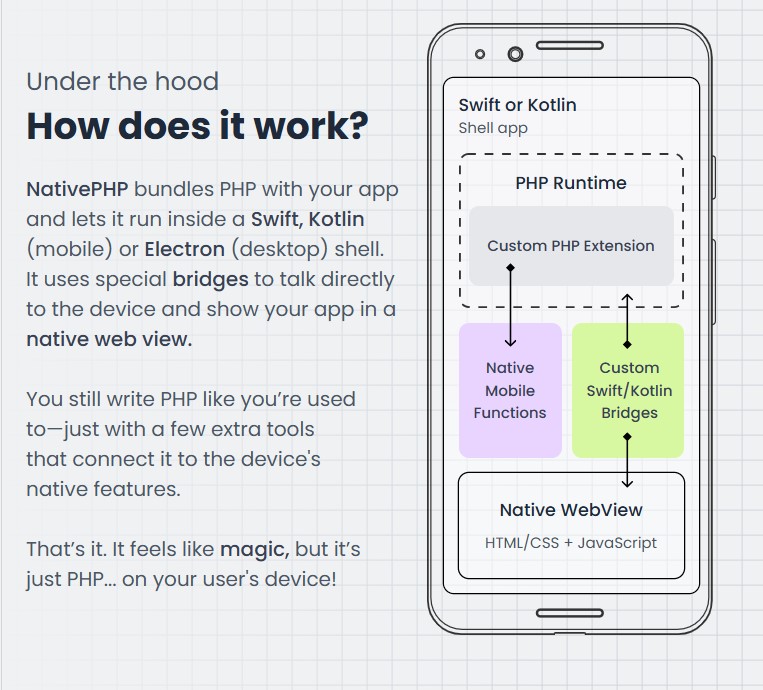
NativePHP bundles PHP with your app and lets it run inside a Swift, Kotlin (mobile) or Electron (desktop) shell. It uses special bridges to talk directly to the device and show your app in a native web view.
You still write PHP like you’re used to—just with a few extra tools that connect it to the device’s native features.
That’s it. It feels like magic, but it’s just PHP… on your user’s device!
Who Should Consider NativePHP?
-
Laravel developers wanting to build desktop/mobile apps
-
SaaS teams needing a companion desktop app
-
Internal tools and admin dashboards
-
MVPs and proof-of-concept native apps
NativePHP vs React Native & Expo
React Native (often paired with Expo) is a popular choice for cross-platform mobile apps — but it comes with trade-offs.
Key Differences
| Feature | NativePHP | React Native + Expo |
|---|---|---|
| Primary Language | PHP | JavaScript / TypeScript |
| Learning Curve | Low (for Laravel devs) | Medium to High |
| Backend Integration | Native Laravel | Separate backend |
| Desktop Apps | ✅ Yes | ❌ No |
| Native APIs | PHP-based bridges | JS-based bridges |
Bottom line:
If you’re already comfortable with Laravel, NativePHP is far more approachable. React Native shines for JavaScript-heavy teams but adds complexity for PHP developers.
NativePHP vs Flutter
Flutter is another strong cross-platform framework — but it requires learning Dart and Flutter’s UI system from scratch.
Key Differences
| Feature | NativePHP | Flutter |
|---|---|---|
| Language | PHP | Dart |
| UI Approach | Web + Native APIs | Custom-rendered UI |
| Laravel Integration | Seamless | External backend |
| Desktop Support | ✅ Yes | ✅ Yes |
| Learning Investment | Low | High |
Flutter offers excellent performance and beautiful UI, but NativePHP wins when speed, familiarity, and Laravel integration matter more than pixel-perfect design.
When NativePHP Makes the Most Sense
NativePHP isn’t trying to replace React Native or Flutter — it solves a different problem.
It shines when:
-
You already use Laravel
-
You want to reuse backend logic
-
You need a native desktop companion app
-
You want faster time-to-market
For Laravel developers, it feels less like learning a new framework and more like unlocking a new superpower.
Frequently Asked Questions (FAQs)
Is NativePHP production-ready?
Yes, NativePHP is actively developed and already used in real-world applications, especially for desktop apps.
Can NativePHP access native OS features?
Absolutely. It supports system notifications, menus, file access, and more.
Does NativePHP replace mobile frameworks?
No. It’s an alternative focused on Laravel-first workflows, not a universal replacement.
Is JavaScript required?
Minimal. Most logic stays in PHP, especially compared to React Native.
Can I use Tailwind or Blade?
Yes — NativePHP integrates cleanly with familiar Laravel frontend tools.
Is NativePHP free?
Core tools are open-source, with optional paid offerings depending on platform features.
Final Thoughts
NativePHP proves that PHP is far from outdated. By bringing Laravel into the native app world, it opens doors for developers who want to ship faster without reinventing their stack.
Checkout the official website here — it’s worth experimenting with today.
Also Read: What Is ClawdBot? The Viral AI Assistant That Actually Does Things