
Introduction
Imagine having an AI assistant that doesn’t live inside a single app or website — but instead follows you everywhere. On your phone. On your computer. Inside WhatsApp, Telegram, or Slack.
That’s exactly what ClawdBot does.
ClawdBot is a personal AI assistant you run on your own device. It responds inside the messaging apps you already use and, unlike most chatbots, it can actually take actions — not just reply with text.
What Is ClawdBot?
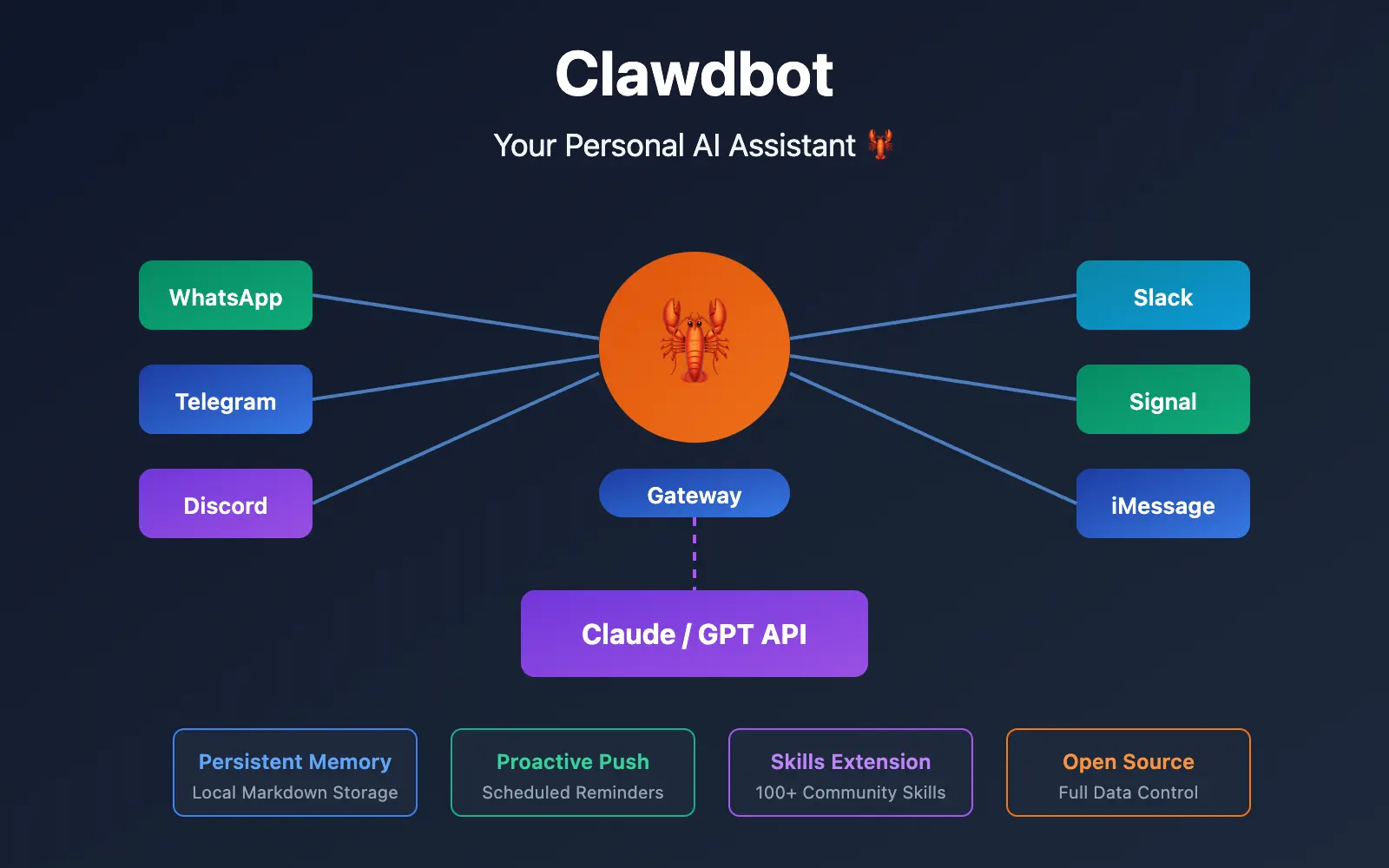
ClawdBot is a self-hosted AI assistant that runs on your computer or server and connects to popular messaging platforms like:
-
WhatsApp, Telegram, Slack, Discord, Signal, iMessage, Microsoft Teams, Google Chat
Instead of opening a website or app to talk to AI, you simply message ClawdBot where you already chat.
Think of it as a smart assistant that:
-
remembers past conversations
-
understands context
-
and can perform real tasks on your system
What Makes ClawdBot Different From Other AI Assistants?
Most AI tools stop at conversation. ClawdBot goes much further.
Works Inside Your Favorite Chat Apps
You don’t need to learn a new interface. ClawdBot lives directly inside your messaging apps and responds like a real contact.
Persistent Memory
ClawdBot remembers what you tell it — meetings, preferences, ongoing tasks. You don’t have to repeat yourself every day.
Takes Real Action
ClawdBot can:
-
browse the web
-
run terminal commands
-
manage files
-
automate workflows
-
control browsers and tools
It’s not just answering questions — it’s doing work.
Your Data Stays With You
Because ClawdBot runs on your own machine:
-
no third-party servers
-
no hidden data sharing
-
full control over files and permissions
Runs 24/7
Once installed, ClawdBot stays active in the background and is always ready when you message it.
Why People Are Excited About ClawdBot
ClawdBot has gained attention quickly because people are using it in practical, everyday ways:
-
morning briefings with emails and calendar summaries
-
organizing meeting notes automatically
-
managing tasks and reminders via chat
-
controlling smart home devices
-
summarizing articles and research
-
building custom tools just by chatting
For many users, it feels less like a chatbot and more like a digital teammate.
What You Need Before Setting Up ClawdBot
Before you start, make sure you have:
-
A computer or server
-
macOS, Linux, or Windows (via WSL2)
-
-
Node.js (latest version recommended)
-
ClawdBot runs on Node.js
-
-
An AI model account
-
Claude (Anthropic) or ChatGPT (OpenAI)
-
-
Basic terminal knowledge
-
You should be comfortable running simple commands
-
How to Set Up ClawdBot (High-Level Overview)
You don’t need to be an expert, but the setup is technical. Here’s how it generally works.
Step 1: Install ClawdBot
ClawdBot provides a one-line installer that automatically sets up everything needed on macOS, Linux, or Windows (via WSL).
WIndows-
curl -fsSL https://molt.bot/install.cmd -o install.cmd && install.cmd && del install.cmdMac Os-
curl -fsSL https://molt.bot/install.sh | bashYou can also install it via companion app on Mac Os – Download Companion App (Beta) latest release from github.
Step 2: Run the Onboarding Wizard
The onboarding process helps you:
-
choose your AI model
-
connect messaging platforms
-
set security permissions
-
install background services
This step ensures ClawdBot starts automatically and stays running.
Step 3: Start the Gateway
The gateway is what allows ClawdBot to receive and send messages. Once running, it exposes a local control panel you can access from your browser.
Step 4: Connect Messaging Apps
You can link WhatsApp, Telegram, Discord, or other platforms.
Some apps use QR codes, others require bot tokens.
Step 5: Approve Pairing Requests
For security, ClawdBot requires manual approval when a new contact messages it. This prevents unauthorized access.
Step 6: Test It
Send a message from your connected chat app and confirm ClawdBot responds correctly.
Important Safety Tips
Because ClawdBot can access your system, basic security is important:
-
only approve people you trust
-
avoid exposing it directly to the public internet
-
use VPN or SSH if running on a server
-
review enabled skills and permissions regularly
-
consider using a separate number for WhatsApp
Common Issues and Fixes
ClawdBot doesn’t respond
→ Check pairing approval and AI model credentials.
Installation fails
→ Confirm your Node.js version is up to date.
WhatsApp QR code issues
→ Restart the gateway and generate a new code.
What You Can Do After Setup
Once ClawdBot is running, you can:
-
connect more chat platforms
-
install or create new skills
-
automate workflows
-
add voice control
-
move it to a server for 24/7 uptime
The more you use it, the more powerful it becomes.
Final Thoughts
ClawdBot isn’t the easiest AI tool to set up — but that’s also why it’s powerful.
You get:
-
full control
-
real automation
-
persistent memory
-
privacy by default
For developers, professionals, and power users, ClawdBot offers a glimpse of what personal AI assistants should have been all along.
If you’re curious about AI that actually works for you — not just talks — ClawdBot is worth exploring.
Also Read Our Detailed Article On: What Is ClawdBot? The Viral AI Assistant That Actually Does Things